
10 ways Australian businesses can be ready for GDPR
10 ways Australian businesses can be ready for GDPR

10 ways Australian businesses can be ready for GDPR

Upcoming Facebook changes – what you need to know
Today I had a quick Facebook Live on some of the upcoming changes for Facebook Advertising and Facebook’s Terms of Service, and what they will mean for Australian business, marketers, agencies and others in the digital marketing space.
You can have a look here:
Make sure you don’t miss out on more Facebook Lives by joining our Facebook community!
Setting up a basic Facebook Advertising campaign
With over 15 million Australians using Facebook on a regular basis, chances are your target market is on this channel. And small businesses, just like yours, are taking advantage of the opportunity Facebook Advertising presents, with:
But why use Facebook advertising? By advertising Facebook, you can:
Simply put, it is a way for anyone with a Facebook page to pay to promote their content to a specific group of people.
The content appears in your Facebook newsfeed and looks like a regular post. But an ad is easy to spot.
So, let’s take a look.
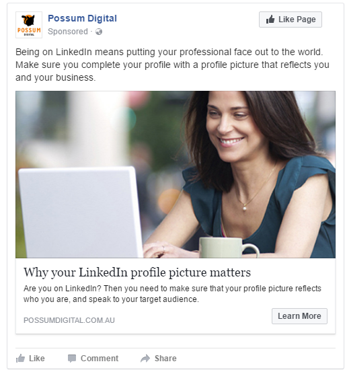
Here you can see that I have been served an ad from Possum Digital.
The absolute give away here, is that the word sponsored is directly underneath the page name. If a piece of content has the word sponsored in this position, then it’s definitely an ad.
Other elements of the ad are:
This particular example is a single image ad. There are other types of ads – carousel ads, lead ads and right hand side ads – but to keep things easy, we’ll focus the rest of this webinar on the type of ad in this example.
Now you know what to look out for, what do you need to start advertising? You’ll need to:
Just a quick side note on Facebook pixel – all a Facebook pixel is, is a piece of web code that allows Facebook to connect with your website.
It helps you track conversions from Facebook ads, optimise ads based on collected data, build targeted audiences for future ads, and remarket to qualified leads— that is, people who have already taken some kind of action on your website.
It works by placing and triggering cookies to track users as they interact with your website and your Facebook ads.
We’re now ready to create our Facebook Ad campaign.
There are 3 stages to setting up Facebook advertising:
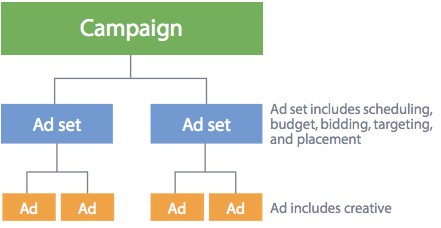
Firstly, setting up your campaign – this is where you set the objective for your campaign.
It is important to note that you can only select 1 objective for each campaign, so choose wisely.
Next, we set up the ad set, where the audience is defined, budget selected and timing scheduled.
With your budget, you can select a budget per day, or a total – or global – budget for the length of your campaign. Either way make sure you always have an end date!
When it comes to defining our audience, there are many ways to select who you wish to serve your ad to (you can also refer to our previous post):
And lastly, the ad creative stage is where you create the actual post that will be seen.
I recommend creating more than one ad so that you can test different images – image versus video – different written messages – or even test what call to action button works best. And remember, you ad is only going to be as effective as the landing page your send people to. The destination matters!
At the end of any ad campaign, it’s important to look at the results.
Based on what the original objective was, here are some metrics you can look at the determine success:
If your objective was around awareness, look at:
If your objective was around engagement, look at:
And finally, if your objective was around conversions, look at:
There is so much more we can talk about in the world of Facebook advertising, but I recommend setting up something simple with a small budget first, We’d love to hear how you go with your ad campaign! Feel free to drop over to our Facebook page and leave a comment there.

Facebook Advertising audiences you can target
With Facebook announcing changes at the beginning of the year (just organic news feed changes, not Facebook Advertising), many Facebook page holders went into panic. How will these impact reach? How will engagement be effected? Will anyone see my content ever again?
But just like any good marketing plan, you need to be flexible to changing outside circumstances. So if you haven’t before, you may want to consider investing some budget in Facebook Advertising.
Have you advertised on Facebook before? What was your experienced? Did you get the results you were after?
Chances are, one of the biggest challenges you faced was knowing who to actually target and how to find them. With 15 million monthly active users on Facebook in Australia (source) there’s a huge pool of potential customers. But if you have a limited budget, you need to be laser focused on how you spend your advertising dollars.
Before you start any more ad campaigns, below are the types of audiences you can use. The type you’ll need will be based on your own circumstances, but the more you test and measure, the better your targeting will be.
TIP: Make sure you get a Facebook pixel from your account and place it on your website. This article from Social Media Examiner walks you through how to do this.
Let’s look at the types of audience targeting options available to you:
Core Audiences
This type of targeting allows you select your audience through personal and behavioural characteristics. You can target:
It’s important to note that Facebook has announced changes to access to 3rd party data providers, which may impact on some core targeting. (source)
Custom Audiences
You can target people on Facebook who have engaged with you and your business. There are two sources for where this data come from:
This type of targeting is my favourite, as you are using your own data to create Facebook Advertising campaigns.
Creating a Custom Audience from your email list is easy. You simply upload your list in a .txt format and Facebook will do the rest. What you may want to think about is segmenting your list into categories like:
This helps you refine your targeting even further, and will help with Lookalike Audiences.
For website traffic, you can use your Facebook pixel to create an audience of people who do things like:
Again, the more defined your audience is, the better you can target your message.
Lookalike Audiences
Facebook can help you find other users who look like you custom audiences. All you need to do is create your Custom Audience, then ask Facebook to create a Lookalike Audience for you.
Importantly, the quality of the Lookalike Audience is going to depend on the quality of your original data and how you have set up your Custom Audience(s). There more specific or segmented you can be, the better the outcome.
Over to you
How will you change how you target people on Facebook?
Do you have a plan for each social media channel?
Hands up if you have a marketing, or more specifically, a social media marketing strategy? If you do, well done! If you don’t, stop reading and go and get my 1 page template social media plan template.
In your plan, you are likely to have identified what channels you are going to use to promote your business (hopefully through building a community and sharing valuable content). And if you are going to be using more than one social media channel (or platform) to market your business, then I always recommend creating a mini plan for each one.
Creating a mini plan for each channel is really easy. Get a blank piece of paper, and some different coloured pens (if that takes your fancy!) and start writing.
Putting it simply, this is the WHY. What is the value that this channel brings to your business?
For example: “I will use my LinkedIn profile to build my credibility as an expert in [your industry]”
Here you will look at no more than 3 specific goals for your channels. These goals should be SMART (Specific Measurable Achievable Relevant and Time Limited) and relate to your business goals.
For example: “I will ask for 3 recommendations on my LinkedIn profile each week for the next 3 months. This will help build social proof and credibility for my business.”
Who will you be talking to through this social media channel? Who your audience is for your Facebook page may be different to who you will be speaking to through Twitter or your LinkedIn profile.
Make sure you are specific as possible – you can’t target all SMEs in Australia, but you can target SMEs owners aged 35 – 50 in Sydney who are B2C focussed.
What are the actions will you do each day, and each week to reach your goals? Tactics are actions that are in line with your strategy, and will help you achieve your goals.
Examples of tactics include:
And that’s it! I’d love to hear how your planning is going. Did you find this exercise hard? Did it help you get clarity on what you’re doing? Did you remove or add and social media channels to your marketing mix?